NEXUS BETA
Get for Windows
DESKTOP APP FOR WINDOWS · MADE IN SINGAPORE

Your own AI assistant for everyday life and small business

Ask in plain words. NEXUS finds your MRT route, checks what your HDB flat is worth, sends you a morning brief on Telegram, plans your Instagram reels and reads your Outlook or Gmail. It always asks you first before it sends, posts or deletes anything.

28
Apps it can connect to
11
Work with no login
You
Approve every send and post
Your PC
Logins stored encrypted
Download for Windows See it in action

Freelancer or small-business owner in Singapore? Become a beta tester

Who it's for: Freelancers · Small businesses · Home and family

New in 0.1.27: NEXUS now repairs itself if an update is cut short. Also new: three helpers (Get Found Online, Customer Reply Helper, Quote and Proposal Writer), and NEXUS keeps you signed in on your own computer. Also: connect Gmail, Google Calendar and Google Drive in one tap. NEXUS is easy for everyone: a simple home screen, a Chat button (or press Ctrl + Shift + Space anywhere), 4 welcome questions that set NEXUS up for you, and NEXUS on your phone in 3 steps. Also: invoices with a PayNow QR, weather in your morning brief, and a 7-day free trial. Also: a FairPrice shopping list and one-tap Microsoft 365. How to connect

NEXUS · YOUR ASSISTANTS
RUNS ON YOUR PC
MOVE YOUR MOUSE TO EXPLORE
YOU APPROVE
REAL SCREENS FROM THE APP

See NEXUS at work

These are real screens from NEXUS on a Windows PC, not mock-ups.
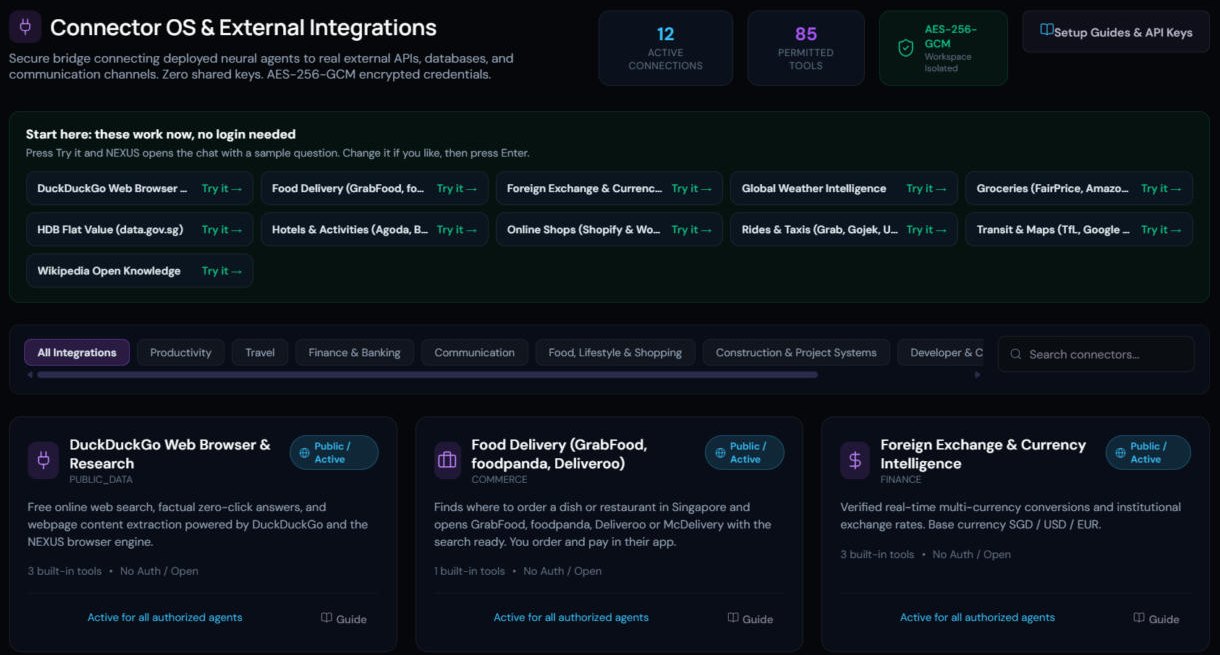
NEXUS Connections page with a Start here box listing connectors that work with no login, each with a Try it button
Start here. Weather, MRT, food delivery, rides, FairPrice links, hotels and HDB flat value work the moment you install. Press Try it to ask a sample question.
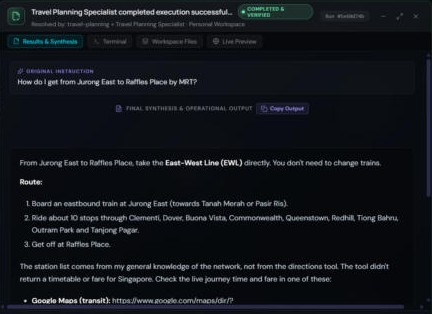
NEXUS answering 'How do I get from Jurong East to Raffles Place by MRT?' with the East-West Line route and a Google Maps link
Ask in plain words. "How do I get from Jurong East to Raffles Place by MRT?" NEXUS gives the route and says where the answer came from.
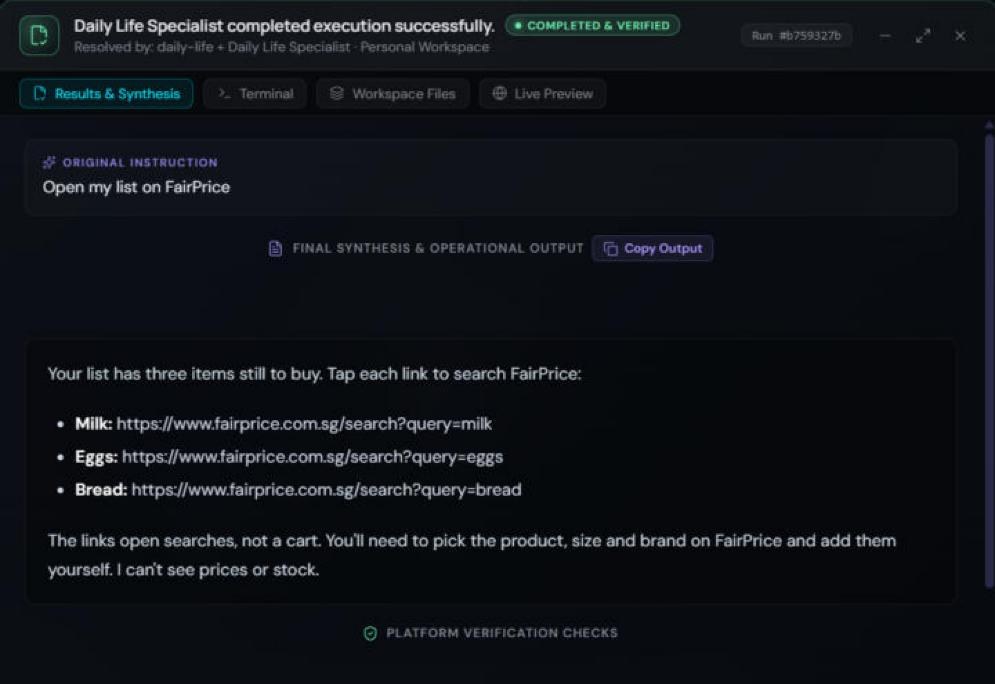
NEXUS answering 'Open my list on FairPrice' with one FairPrice search link each for milk, eggs and bread
Your shopping list. "Add milk, eggs and bread to my list", then "open my list on FairPrice". You choose the brand and check out on FairPrice yourself.

Everyday

MRT and bus routes, weather, food delivery, Grab and Gojek ride links, FairPrice grocery links, hotels and currency rates.

Home

What your HDB flat is worth, a watch on its value, and a step-by-step guide if you decide to sell it yourself.

Your day

A morning brief on Telegram, and answers from your own Outlook, Gmail, calendar and files once you connect them.

Your business

Plan and schedule Instagram reels, answer comments, check Stripe payments. Stripe is read-only. Every post and reply waits for your OK.

Download for Windows What can it connect to?
EXAMPLES FOR BUSINESSES

What NEXUS can do for a business

Example runs on sample data: a customer-complaints report, an email reply that waits for your approval, and a week of social posts for a bakery.

analyze customer complaints dataset and generate executive SLA briefing deck
OPERATIONS SPECIALIST // DATA-WORKFLOW
Parser → dataset.csv (100 rows) → Calculated SLA Breach Rate: 44.7% → Escalation Ratio: 22.0% → Artifact: Markdown Briefing & HTML Slide Deck
[00:00.12] [NEXUS KERNEL] Invoking specialist: operations (v1.0.0)
[00:00.34] [INPUT] Verified dataset format: CSV (100 records, columns: id, customer, tier, response_time, escalated)
[00:00.61] [COMPUTE] Synthesizing metrics across customer tiers...
           - Total Incidents: 100
           - SLA Breach Rate: 44.7% (45/100 threshold violations > 120m)
           - Escalations to L3 Support: 22.0% (large customers: 12%, small customers: 10%)
           - Primary Root Cause: Webhook dispatch latency in Payment Gateway
[00:01.05] [ARTIFACT EMITTED] briefing-deck.html & executive-summary.md
[00:01.08] [STATUS] Sample data • Ready for review
READY-MADE ASSISTANTS

More than 50 ready-made assistants, each good at one job

Operations, money, sales, marketing, travel and more. Each one only uses the apps you allow it to.

OPERATIONS

Operations Specialist

Helps you find what slows your work down, write step-by-step procedures, and plan who does what.

Procedures Planning Work reports
FINANCE

Finance Specialist

Helps with budgets, cash flow forecasts and checking your numbers. Connect Stripe to see who has paid. It only reads.

Budgets Cash flow Stripe (read-only)
SALES

Quote and Proposal Writer

Turns a few notes into a clear quote or short proposal: what is included, your price lines, timeline and terms. It uses only the prices you give. Draft only. How the quote writer works

Quotes Proposals Draft only
CUSTOMERS

Customer Reply Helper

Drafts replies to customer emails and messages in the customer's language and tone. You check and send. Refunds, complaints and disputes are flagged for your decision. How the reply helper works

Customer replies Your tone Draft only
MARKETING

Marketing Specialist

Helps you work out who your customers are, how to describe what you sell, and how to plan a campaign.

Customer profiles Positioning Campaign plans
YOUR DAY

Executive Assistant

Checks your calendar, prepares notes before a meeting, and tracks what you need to do. With Gmail connected it can read emails and write drafts. It never sends until you press Approve.

Google Calendar Gmail read and draft Meeting notes
See more assistants
CHOOSE YOUR AI

Use the AI model you prefer

Bring your own key for Claude, OpenAI or Gemini, or run a local model on your own PC.

GPT models
A good all-round choice for writing, questions and everyday tasks.
Claude models
Good at long documents and careful, well-written drafts.
Gemini models
Good for quick answers and for reading large files.
Through NVIDIA NIM or OpenRouter
Good at step-by-step reasoning and working with numbers.

Run an AI model on your own PC

Run a local model with Ollama (http://localhost:11434), vLLM or LM Studio. Your chats are then not sent to an outside AI company.

How to set up a local model →
EXAMPLE OUTPUTS

Examples of finished work

Made by NEXUS assistants from sample data during testing, so you can see the kind of report you get.

Executive Briefing: Q3 Customer Complaints & SLA Root Cause
Made by the Operations Specialist • Sample data
Sample data
## EXECUTIVE SUMMARY: SUPPORT INCIDENT ANALYSIS Dataset: 100 sample customer ticket logs 1. KEY PERFORMANCE INDICATORS - Total Analyzed Records: 100 tickets - SLA Breach Incident Rate: 44.7% (45 tickets exceeded the 120-minute response SLA) - L3 Escalation Rate: 22.0% (22 tickets required Tier 3 Engineering Intervention) - Critical Tier Impact: Large-customer SLA compliance dropped to 52.3% during peak gateway outage 2. BREAKDOWN BY CUSTOMER SEGMENT - Large Tier (40 tickets): 19 breaches (47.5%), 12 escalations (30.0%) - Growth Tier (35 tickets): 16 breaches (45.7%), 6 escalations (17.1%) - Starter Tier (25 tickets): 10 breaches (40.0%), 4 escalations (16.0%) 3. MAIN CAUSES OF LATE REPLIES - Main cause (64% of late replies): tickets waited while the payment gateway was down - Second cause (26% of late replies): tickets were passed between teams before anyone replied
CONNECT YOUR APPS

Connect your apps

Many apps work with no login. Others take one tap or a key from the service. Read the simple guide. Step-by-step setup guides are below.

G

Gmail, Calendar and Drive

One tap. Press Connect, pick your Google account, done. No keys to copy. The guide shows what to do if Google shows a warning screen.

Read the Google guide →
X

Xero

Xero needs more setup. You create your own app on Xero's site and paste its keys into NEXUS. The guide has each step.

Read the Xero guide →
S

Stripe: see who paid

Make a read-only key in Stripe and paste it into NEXUS. NEXUS can then tell you who has paid. It cannot charge or refund anyone.

Read the Stripe guide →
See all setup guides
Karthik
FOUNDER
FOUNDER PHILOSOPHY

"AI should be for everyone, not only for companies."

NEXUS is built for people across Asia. Your own AI workforce, in your own workspace, with your data kept to yourself. Honest results, nothing faked, and you approve anything that matters.

Read Karthik's story →
QUICK ANSWERS

Common questions

Short answers about price, privacy and what NEXUS does.

What is NEXUS AI OS?

NEXUS AI OS is a desktop AI assistant for Windows. It is made in Singapore by Karthik. You chat with it in plain words and it helps with daily tasks at home and at work.

How much does NEXUS cost?

NEXUS is free for 7 days. After the trial it costs S$29 a month. One licence works on 2 computers. You pay by card through Stripe on this site.

Can I get a refund?

No. NEXUS has a 7-day free trial so you can try everything before you pay. After you subscribe, payments are not refunded. You can cancel any time from the billing portal and you keep access until the end of the month you paid for.

Is my data private?

Your accounts, files and keys stay on your own PC. NEXUS never sends an email until you press Approve.

What can NEXUS do for me?

It can give you a morning summary with the weather, make invoices with a PayNow QR, and keep a shopping list with FairPrice links. It can also search flight and hotel prices, give MRT and bus directions, and look up what an HDB flat is worth.

Which apps can I connect?

You can connect Gmail, Google Calendar and Google Drive in one tap. NEXUS also works with Microsoft 365 and Notion. With Telegram you can chat with NEXUS from your phone.

Which computers does it work on?

The current version, 0.1.27, is for Windows. The Mac and Linux downloads are an older version, 0.1.3. The Windows build is unsigned, so Windows may show a SmartScreen warning when you install it.

Is NEXUS AI OS related to other products called Nexus?

No. NEXUS AI OS from nexusaios.space is made in Singapore by Karthik. It is not related to other products with similar names.

TRY IT

Try NEXUS on your PC

Download NEXUS for Windows. Start with the things that need no login, then connect your own apps when you are ready.

Download Desktop Client How to connect your apps