Groceries, the MRT route and your flat's value. Just ask.
NEXUS AI OS is a desktop AI assistant for Windows, made in Singapore. At home, you type a question in plain words. It keeps your shopping list with FairPrice links, gives MRT and bus directions, looks up HDB flat values, tells you the weather and searches flight and hotel prices.
Free for 7 days. Windows version 0.1.27.
What can you ask NEXUS at home?
Here are questions written the way people type them.
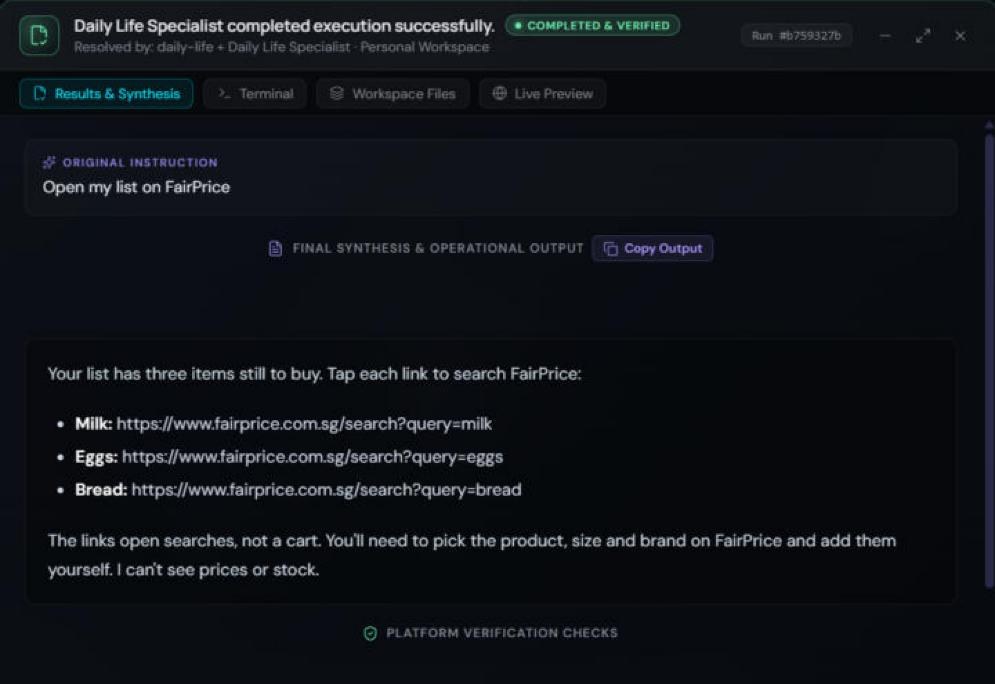
Add milk, eggs and bread to my shopping list.
Later, type Open my list on FairPrice to get a link for each item.
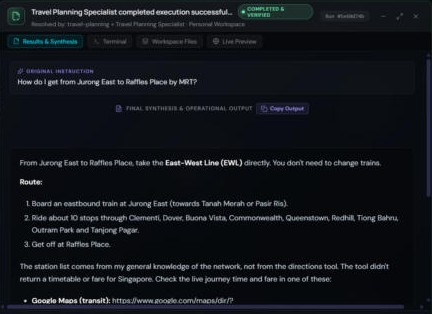
How do I get from Jurong East to Raffles Place by MRT?
You get the route. Bus directions work too.
What is a 4-room HDB flat in Punggol worth?
NEXUS looks up the flat value. There is also a free Flat Worth page.
Will it rain in Singapore this afternoon?
The weather is also in your morning summary.
Find hotel prices in Penang for 2 nights next weekend.
NEXUS searches flight and hotel prices for your trip.
What does my insurance policy say about hospital stays?
Put the PDF in My files and ask about your own documents.
How does the shopping list work?
Tell NEXUS what you need as you think of it. When you are ready to shop, it turns the list into FairPrice links, one for each item.
How do you get started?
- Download and install. NEXUS is on the download page. Windows may show a warning when you install it, because the installer is unsigned.
- Answer 4 short questions. NEXUS makes a setup plan for you. It needs a free AI key from Google, or your own Claude key. It shows you each step, and this takes about 2 minutes.
- Ask your first question. Click the Chat button. Or press Ctrl + Shift + Space from anywhere on your computer.
Want NEXUS to read your Gmail or calendar too? The guide to connecting apps shows how.
What can NEXUS not do for you?
It helps you find and plan. You do the buying.
- It cannot book a Grab ride or order your dinner. It gives you the links.
- It cannot pay for anything. NEXUS does not move money.
- It cannot answer when your computer is off. On Telegram it will tell you the PC is off.
- It does not send emails by itself. An email goes out only after you press Approve.
What is the price?
The price covers 2 computers, so the family PC and a laptop can both have it.
Your accounts, files and keys stay on your own PC. The privacy page has the details.
Questions people ask before trying it
Do I need to be good with computers to use NEXUS?
No. You type in plain words. The first start asks 4 questions and makes a setup plan for you. Adding the free AI key from Google is guided and takes about 2 minutes.
Can NEXUS order my groceries?
No. It keeps your shopping list and gives you a FairPrice link for each item. You choose what to buy and pay on FairPrice yourself.
Can NEXUS book a Grab ride for me?
No. It cannot book rides or order food. It gives you links and you book in the app.
Is NEXUS free?
It is free for 7 days. After the trial it costs S$29 a month, and that covers 2 computers.
Can I ask NEXUS something from my phone?
Yes, through Telegram. Your PC must be on. If it is off, NEXUS tells you on Telegram that the PC is off.
Run your own business too? NEXUS has pages for freelancers and for small businesses.